# Puck review: the visual editor for React components
*Source: https://www.editorstack.cc/libraries/puck — last updated 2026-08-19. Licensed CC BY 4.0 with attribution to EditorStack.*
## Summary
- Puck is an MIT-licensed visual editor for React whose canvas renders your production components, so the thing an editor arranges and the thing a user sees are the same code.
- We measured Puck 0.20.2 at 90.4 kB gzip with React treated as external, and got a working editor from 16 lines of application code.
- Puck has no CSS style manager by design: users change the props your components expose, which keeps pages on-brand and rules Puck out when users expect free-form design control.
## Quick facts
| Fact | Value |
| --- | --- |
| Type | library |
| Licence | MIT |
| First release | 2023-06 |
| Language | TypeScript |
| Frameworks | React |
| SSR support | full |
| Bundle (min+gzip) | 90.4 kB gzip |
| Pricing | Free (open source) |
| npm weekly downloads | 146,091 |
| GitHub stars | 13,332 |
| Latest version | 0.20.2 |
| Last verified | 2026-08-19 |
| Drag & drop canvas | Yes |
| Responsive breakpoints | Partial |
| Visual style manager | No |
| Custom components | Yes |
| Data binding | Yes |
| E-commerce blocks | No |
| Email HTML export | No |
| AI generation | No |
| Editor i18n | Partial |
| White label | Yes |
| Self-hosted | Yes |
## What Puck is, and who it is for
Puck is a visual editor that treats your React components as the unit of editing. You describe each
component once — its editable fields, its defaults, how it renders — and Puck generates an editor
around that description. Users drag components onto a canvas and fill in fields; you get back a JSON
tree of component names and props.
This makes it the natural choice for a specific and increasingly common situation: a React product
with a design system, where marketing or customer-success people need to assemble pages from
approved components without a deploy. The alternative in that situation is usually a hosted
platform, and Puck's proposition is that you can have the editing experience without moving your
content to someone else's infrastructure.
It is the wrong choice when the editor has to leave React, when the output must be portable HTML,
or when users expect to change typography and spacing freely. Those are the cases
[GrapesJS](/libraries/grapesjs) exists for, and the
[GrapesJS vs Puck comparison](/compare/grapesjs-vs-puck) works through the boundary in detail.
## Architecture: config in, JSON out
Puck's architecture is unusually easy to hold in your head, which is a large part of its appeal.
A **config** object maps component names to definitions. Each definition declares `fields` (what the
editor shows), `defaultProps` (what a new instance starts with) and `render` (your actual React
component). A **data** object holds the page: an array of component instances, each with a name and
its props, plus a root section.
The editor renders the data through the config. The public page renders the same data through the
same config using the `Render` component. There is no export step, no HTML serialisation, and no
second implementation of your components for the editor's benefit — the reason so many
GrapesJS-based products end up with drift between canvas and production.
Because the data is just typed JSON, it goes in your database next to everything else, versions
with your normal tooling, and is queryable. The trade is that it means nothing outside your app:
without the config, the data is a list of names.
## Getting started
This is the file from our benchmark, which produced the measurements on this page and the screenshot
below.
```jsx
import { createRoot } from 'react-dom/client';
import { Puck } from '@measured/puck';
import '@measured/puck/puck.css';
const config = {
components: {
Heading: {
fields: { text: { type: 'text' } },
defaultProps: { text: 'Hello editor' },
render: ({ text }) => {text}
,
},
},
};
const data = { content: [{ type: 'Heading', props: { id: 'h1', text: 'Hello editor' } }], root: {} };
createRoot(document.getElementById('app')).render(
{}} />,
);
```
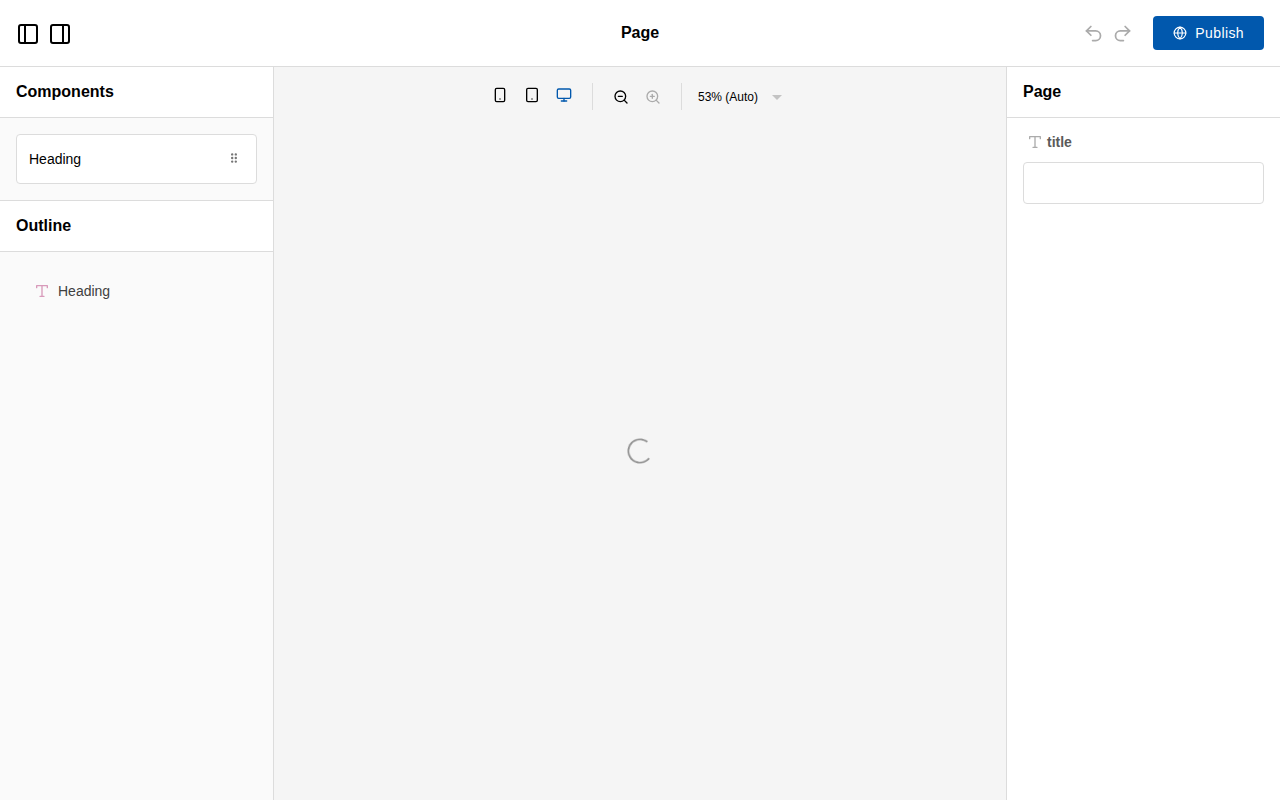
*Puck 0.20.2 from the code above, screenshotted from our own build at 1280×800.*
Compare that screenshot with the [Craft.js one](/libraries/craftjs): both are React editors, and the
difference in what you get for free is the entire argument between them.
In our benchmark this reached a rendered editor in a median of 852 ms, the second slowest of the six
libraries we measured, because it boots React and an iframe preview before the editor exists. That
is a one-time cost on an authenticated editor route, not something your visitors experience — see
the [time to first editor benchmark](/research/time-to-first-editor-benchmark) for the method.
## Strengths
**The config is the whole API.** A React developer who has never seen Puck can add an editable
component in minutes, and TypeScript catches field mistakes at compile time rather than at runtime.
Very few editor libraries have a surface this small.
**No canvas-to-production drift.** The editor renders your real components. When you change a
component, the editor changes with it, because there is no second copy.
**Typed content.** Renaming a prop is a compile error rather than a page that quietly loses a
section. Storing HTML gives you no such guarantee, and this is the single most underrated advantage
of the component-tree model.
**Your data stays yours.** Puck hands you JSON and steps back. No vendor storage, no CDN dependency,
no per-seat pricing, no data-residency conversation.
**Genuinely good documentation.** The docs are task-shaped, with runnable examples for the paths
teams actually take — App Router, custom fields, external data sources.
## Limitations
**React only, permanently.** This is not a gap to be filled later; the canvas renders React. If any
part of your roadmap involves offering the editor to customers on other stacks, Puck cannot go
there.
**No style manager.** Users cannot change padding, colour or typography unless you build a field for
it. For a design-system use case this is the feature. For a website builder you resell, it is a
missing half of the product, and bolting a styling layer on top means designing that system
yourself.
**A young ecosystem.** First published in June 2023. There is little third-party plugin supply, so
unusual field types are yours to write. That is cheaper than it sounds because the contract is
small, but it is a real difference against a decade-old catalogue.
**Slowest-but-one to first paint.** 852 ms in our benchmark against 94 ms for Craft.js. Acceptable
for an editor route; worth knowing if you intend to embed the editing surface in a page users hit
constantly.
**Email is out of scope.** No table-based output, no client testing. See the
[email template builder use case](/use-cases/email-template-builder-for-saas) for what to use
instead.
## Pricing
Free, MIT licensed, no paid tier for the core editor and no usage ceiling. The costs are the ones
you would incur anyway: building the components you want editable, and the persistence and
permissions layer around the JSON. Our [build-versus-buy calculator](/use-cases/build-vs-buy-visual-editor)
puts numbers on that against commercial SDK pricing — with Puck you can uncheck the UI line, which
changes the arithmetic substantially.
## Who it fits, and who it does not
**Good fit**
- React and Next.js products where marketing pages must be assembled from the app's existing component library
- Teams that want page content stored as typed JSON they control rather than as generated HTML
- Adding a drag-and-drop layer to an existing design system without rewriting the components
**Poor fit**
- Applications outside React, since there is no Vue or Angular path and the canvas is React-native by design
- Free-form pixel-level design, because there is no CSS style manager — layout comes from the props your components expose
- Email template building, where the output must be table-based HTML rather than React components
## Puck against its nearest neighbours
| Product | Type | Licence | Frameworks | Bundle (min+gzip) | Price from | Self-hosted | White label | Score |
| --- | --- | --- | --- | --- | --- | --- | --- | --- |
| [Puck](https://www.editorstack.cc/libraries/puck) | library | MIT | React | 90.4 kB gzip | Free (open source) | Yes | Yes | 8 |
| [BlockNote](https://www.editorstack.cc/libraries/blocknote) | library | MPL-2.0 | React, Vue | 386.1 kB gzip | from $195/mo | Yes | Yes | not scored |
| [Craft.js](https://www.editorstack.cc/libraries/craftjs) | library | MIT | React | 29.2 kB gzip | Free (open source) | Yes | Yes | 6.6 |
| [GrapesJS](https://www.editorstack.cc/libraries/grapesjs) | library | BSD-3-Clause | Any (framework-agnostic) | 294.6 kB gzip | Free (open source) | Yes | Yes | 7.5 |
## Our scores
- **developer experience: 9/10.** The config object is the whole API: you describe components, their fields and their defaults, and the editor is generated from that. A React developer who has never seen Puck can add a new editable component in minutes, and the typings catch field mistakes at compile time rather than at runtime.
- **extensibility: 8/10.** Custom fields, overrides for editor chrome and a plugin interface cover most product requirements without forking. The ceiling is lower than a full engine: you are shaping an editor around React components, not building an arbitrary design surface with its own style engine.
- **documentation: 8.5/10.** Docs are task-shaped rather than reference-shaped, with runnable examples for the paths teams actually take — Next.js App Router, custom fields, external data sources. Gaps appear in the advanced areas such as multi-user editing and large-document performance.
- **ecosystem: 6/10.** Younger than the alternatives, so third-party plugin choice is limited and most teams write their own field types. That is less costly than it sounds because the component contract is small, but it is a real difference against a decade-old plugin catalogue.
- **time to production: 8.5/10.** Because the editor renders your production components directly, there is no export step and no HTML-to-component translation to maintain. For a React team this is the fastest route in the dataset from install to something you can put in front of a customer.
## Alternatives
- [Puck vs Editor.js](https://www.editorstack.cc/compare/editorjs-vs-puck)
- [Puck vs GrapesJS](https://www.editorstack.cc/compare/grapesjs-vs-puck)
- [Puck vs Builder.io](https://www.editorstack.cc/compare/puck-vs-builder-io)
- [Puck vs Craft.js](https://www.editorstack.cc/compare/puck-vs-craftjs)
- [Puck vs Plasmic](https://www.editorstack.cc/compare/puck-vs-plasmic)
- [Puck vs React Page](https://www.editorstack.cc/compare/puck-vs-react-page)
- [Puck vs Storyblok](https://www.editorstack.cc/compare/puck-vs-storyblok)
## Frequently asked questions
### Is Puck free?
Yes. Puck is MIT licensed with no paid tier for the editor itself, so you can ship it inside a commercial product with no fee and no usage ceiling.
### How big is Puck?
We measured @measured/puck 0.20.2 at 90.4 kB gzip (282.3 kB raw), with React and react-dom marked external on the basis that a React application already ships them.
### Does Puck work with Next.js App Router?
Yes, and it is the best-supported integration path. The renderer works in server components and the editor is a client component, so the usual pattern is a client-side editor route plus a server-rendered public page reading the same JSON.
### Can users change colours and spacing in Puck?
Only through fields you expose. There is no style manager that writes arbitrary CSS, which is a deliberate constraint: it keeps pages inside your design system. If users need free-form styling, GrapesJS is the tool with that feature.
### Where does Puck store pages?
Wherever you put them. Puck hands you a JSON object on publish and you persist it; there is no hosted service and no vendor storage, which is the main structural difference from Builder.io or Plasmic.
### Can Puck build email templates?
Not usefully. Its output is a JSON tree of React component instances, and email needs table-based HTML with inlined CSS. Use an email-specific SDK or GrapesJS with the newsletter preset instead.
## Sources
1. [npm registry metadata for @measured/puck (licence, first publish date, latest version)](https://registry.npmjs.org/@measured/puck) — accessed 2026-08-19
2. [Puck source repository](https://github.com/measuredco/puck) — accessed 2026-08-19
3. [Puck documentation](https://puckeditor.com/docs) — accessed 2026-08-19