CKEditor 5 review: a finished editor with a GPL-or-commercial licence
CKEditor 5 is a finished rich-text editor with a toolbar, a plugin architecture and first-party React, Vue and Angular integrations, dual-licensed under GPL-2.0-or-later for self-hosted use or under commercial terms, with collaboration, AI and email tooling sold as premium features.
TL;DR
- CKEditor 5 is a finished WYSIWYG editor rather than a framework: a toolbar, a data pipeline and a plugin architecture arrive on install, with first-party React, Vue and Angular integrations from the same vendor.
- It is dual-licensed: self-hosted use under GPL-2.0-or-later with licenseKey set to 'GPL', which shows a 'Powered by CKEditor' logo, or commercial terms. Collaboration, AI and the email tooling are premium features on paid plans.
- We measured ckeditor5 48.5.1 at 161.2 kB gzip for ClassicEditor with Essentials, Paragraph, Bold and Italic, and our benchmark application needed 9 lines of code.
CKEditor 5 quick facts
| Type | Library |
|---|---|
| Editor kind | Rich-text editor, Document editor |
| Licence | GPL-2.0-or-later OR commercial |
| Pricing | from $144/mo |
| Frameworks | Any (framework-agnostic) |
| SSR support | none |
| Self-hosted | Yes |
| White label | Unverified |
| Page builder | No |
| Drag & drop | Partial |
| Email HTML export | Via plugin |
| HTML export | Yes |
| JSON output | Unverified |
| Custom components | Yes |
| Plugin architecture | Yes |
| Real-time collaboration | Via plugin |
| AI features | Via plugin |
| Bundle size (min+gzip) | 161.2 kB gzip |
| First release | 2018-04 |
| Language | TypeScript |
| npm weekly downloads | 1,151,046 |
| GitHub stars | 10,519 |
| Latest version | 49.0.1 |
| Last verified | 2026-09-17 |
Why developers choose CKEditor 5
- Products that need a complete WYSIWYG editor with a toolbar on install rather than a framework to build one from
- GPL-compatible or commercially licensed products that want real-time collaboration and AI features from the same vendor as the editor, bought as premium add-ons
- Enterprise content tools that need many UI languages, right-to-left support and vendor support contracts
Limitations and tradeoffs
Where CKEditor 5 is a poor fit, or where you should expect extra implementation work.
- Closed-source SaaS products that cannot comply with the GPL and do not want a per-load commercial contract
- Teams expecting collaboration, AI assistance or email export to be free, since those are premium features
- Server-rendered pages that must pre-render the editor, because the documentation says it has to load client-side
Benchmark
Tested by EditorStack. Measurements, not a ranking: they describe cost, not fit.
- Bundle size (min+gzip, CSS excluded)
- 161.2 kB
- run bundles-2026-09-17
- Time to first editor (median of 5)
- Not measured
Method and caveats: EditorStack benchmarks · bundle size benchmark · time-to-first-editor benchmark.
CKEditor 5 in depth
What CKEditor 5 is, and who it is for
CKEditor 5 is the editor you install when the requirement is "a rich-text editor" and nobody on the team wants to design one. It arrives with a toolbar, a document model, a data pipeline that turns that model into HTML and back, and a plugin catalogue large enough that most document features are a configuration change rather than a project.
That puts it on the opposite side of the rich-text category from Tiptap and Lexical, which hand you an engine and expect you to build every visible control. The closer comparison is TinyMCE: two long-established, finished editors with first-party integrations for React, Vue and Angular, and two licences that stopped being permissive. CKEditor 5 vs TinyMCE sets them side by side.
It fits content management systems, internal knowledge tools, LMS authoring screens and any product whose users expect a word-processor toolbar. It fits poorly anywhere the licence is a problem, and that is the first thing to establish.
Licensing is the first decision
The npm package declares its licence as "SEE LICENSE IN LICENSE.md", and that file offers two options: GPL-2.0-or-later, or commercial terms from CKSource.
In practice the choice appears in your configuration. Every editor must be given a licenseKey.
Self-hosted GPL use sets it to 'GPL', and the vendor's documentation is explicit that CKEditor 5
without premium features "will then display a small 'Powered by CKEditor' logo". The GPL key works
only with the self-hosted npm or ZIP distribution; the cloud CDN always needs a commercial key.
So there are three realistic positions. A GPL-compatible product self-hosts for free and shows the logo. A closed-source product buys a commercial licence. A product that needs collaboration, AI assistance or the email export features buys a plan that unlocks them, whatever its own licence.
Getting started
This is the file from our benchmark application, unedited: nine lines to a working classic editor with a heading dropdown and bold and italic buttons.
import { ClassicEditor, Essentials, Paragraph, Heading, Bold, Italic } from 'ckeditor5';
import 'ckeditor5/ckeditor5.css';

ClassicEditor.create({
  attachTo: document.getElementById('app'),
  licenseKey: 'GPL',
  plugins: [Essentials, Paragraph, Heading, Bold, Italic],
  toolbar: ['undo', 'redo', '|', 'heading', 'bold', 'italic'],
  root: { initialData: '<h2>Hello editor</h2><p>Type here.</p>' },
});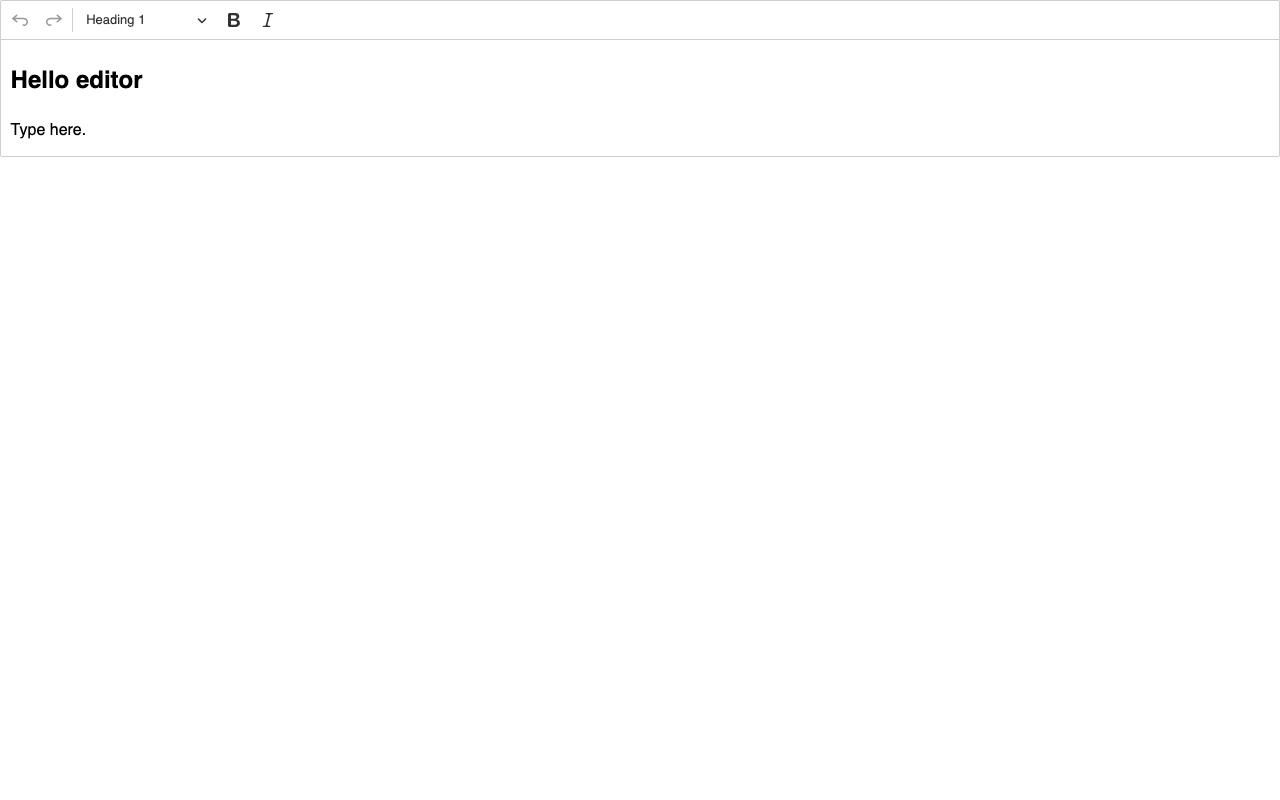
CKEditor 5 48.5.1 from the code above, screenshotted from our own build. Everything visible — toolbar, dropdown, editing area — came from four plugins and one stylesheet import.
Two details from building it. The plugin list is explicit: the toolbar only offers what you imported,
so a missing feature is usually a missing plugin rather than a bug. And the create call accepts a
single configuration object with attachTo, which is how the current documentation and typings
present it.
We have not published a time-to-editor figure for CKEditor 5 yet. The application ran, but on a different machine from the published time to first editor benchmark, and timings from two machines are not comparable. It joins that table on the next full re-run.
Strengths
A finished editor. Toolbar, dropdowns, keyboard handling and HTML output work on install. For a team whose product is not the editor, that is weeks saved.
First-party integrations for React, Vue and Angular. @ckeditor/ckeditor5-react,
@ckeditor/ckeditor5-vue and @ckeditor/ckeditor5-angular are all published by the vendor.
A plugin architecture that reaches deep. The framework documentation walks through building custom block widgets with their own model and view, so product-specific content is supported rather than hacked in.
Localisation. The vendor documents 41 fully translated UI languages and right-to-left support out of the box.
Collaboration from the same vendor. Real-time collaboration is a premium feature, but it is a maintained product rather than a community experiment.
Limitations
The licence decides for you. GPL-2.0-or-later is incompatible with most closed-source SaaS distribution models, and the alternative is a commercial contract priced around editor loads. Teams used to MIT-licensed editors such as Tiptap should budget before prototyping.
The GPL build carries vendor branding. The 'Powered by CKEditor' logo is part of the free self-hosted configuration, which matters for white-label products.
Premium features are where the value concentrates. Collaboration, CKEditor AI, the email configuration helper and export with inline styles are all unlocked by paid plans.
Heavier than the headless frameworks. 161.2 kB gzip for a four-plugin editor, against 123.3 kB for Tiptap with StarterKit and 104.9 kB for Lexical. A realistic configuration with tables, images and lists is larger again.
Client-side only. The Next.js guide says it cannot be pre-rendered with SSR or SSG. That is normal for editors, but it rules out server-rendering the editing surface.
Stored content is HTML. That is exactly what many products want. It is the wrong fit if you need block-structured JSON; see Editor.js for that model.
Pricing
Vendor-published on the day we checked. A cloud-hosted Free plan with 1,000 editor loads per month under a commercial licence. Essential at $160 per month, or $144 per month on the annual toggle, with 5,000 loads and $45 per additional 1,000. Professional at $319, or $289 annually, with 20,000 loads. Custom plans by quote. CKEditor AI and Collaboration are add-ons with their own prices, and self-hosted commercial use is arranged with sales after a 14-day trial.
The GPL route costs nothing in licence fees and everything in licence obligations. For the choice between a finished editor and a framework you assemble, see Tiptap vs CKEditor 5, and for the full category, the rich-text editor comparison.
Use cases and categories
CKEditor 5 against its nearest neighbours
The closest products in the dataset by category, with the facts most people open three tabs to compare. Bundle sizes marked in kilobytes are our own measurements.
| Product | Licence | Bundle | Price from | Self-hosted |
|---|---|---|---|---|
| CKEditor 5 | GPL-2.0-or-later OR commercial | 161.2 kB gzip | from $144/mo | Yes |
| Editor.js | Apache-2.0 | 64.3 kB gzip | Free (open source) | Yes |
| Quill | BSD-3-Clause | 58.7 kB gzip | Free (open source) | Yes |
| TinyMCE | GPL-2.0-or-later OR commercial | 393.9 kB gzip | from $79/mo | Yes |
CKEditor 5 comparisons
Each comparison is a full write-up: where each tool fits, and what moving between them costs.
Frequently asked questions
- Is CKEditor 5 free?
- The self-hosted npm distribution is free under GPL-2.0-or-later, which obliges your product to comply with the GPL, and it displays a 'Powered by CKEditor' logo. Closed-source use needs a commercial licence. The vendor also lists a cloud-hosted Free plan with 1,000 editor loads per month under a commercial licence.
- How much does CKEditor 5 cost?
- Vendor-published: the Essential plan lists $160 per month, or $144 per month on the annual toggle, with 5,000 editor loads; Professional lists $319 or $289 with 20,000 loads; larger plans are quoted. CKEditor AI and Collaboration are priced as add-ons. Self-hosted commercial use is arranged with sales after a 14-day trial.
- Does CKEditor 5 work with Next.js?
- Yes, client-side only. The official Next.js guide says the editor relies on browser APIs and cannot be pre-rendered with SSR or SSG, and loads it through next/dynamic with ssr disabled.
- How big is CKEditor 5?
- We measured ckeditor5 48.5.1 at 161.2 kB gzip (629.9 kB raw) for ClassicEditor with the Essentials, Paragraph, Bold and Italic plugins, CSS excluded. Every feature plugin you add — tables, images, lists, links — adds to that.
- Why is there no time-to-editor figure for CKEditor 5?
- We built and ran the benchmark application, and it is in the repository, but the timing was taken on a different machine from the published run. Timings from two machines are not comparable, so it joins the published table on the next full re-run rather than now.
Sources and verification
Last verified: . Facts on this page were checked against the sources below on the date shown next to each one.
- npm registry metadata for ckeditor5 (latest 48.5.1; first published version 10.0.0-rc.1 in April 2018; licence field points to LICENSE.md) — accessed 2026-09-17
- ckeditor5 48.5.1 LICENSE.md (dual licence: GPL-2.0-or-later or commercial terms from CKSource) — accessed 2026-09-17
- CKEditor licensing options (open-source distribution under GPL 2+, Free plan under a commercial licence) — accessed 2026-09-17
- CKEditor 5 licence key and activation ('GPL' key for self-hosted use, logo display, cloud requires a commercial key) — accessed 2026-09-17
- CKEditor pricing page (vendor-published Free, Essential, Professional and Custom plans) — accessed 2026-09-17
- CKEditor 5 Next.js integration (cannot be pre-rendered with SSR or SSG; load client-side) — accessed 2026-09-17
- CKEditor 5 UI language (41 fully translated languages, right-to-left support) — accessed 2026-09-17
- CKEditor 5 drag and drop (text and content blocks within the editor) — accessed 2026-09-17
- CKEditor 5 tutorial: implementing a custom block widget — accessed 2026-09-17
- CKEditor AI overview (premium feature) — accessed 2026-09-17
- CKEditor 5 real-time collaboration (unlocked with selected CKEditor plans) — accessed 2026-09-17
- CKEditor 5 email editing (email configuration helper and export with inline styles are premium features) — accessed 2026-09-17
- npm registry metadata for @ckeditor/ckeditor5-react, published by ckeditor (also checked: ckeditor5-vue, ckeditor5-angular) — accessed 2026-09-17
This profile is generated from the CKEditor 5 record in the open dataset (JSON, CSV). Unverified facts are left empty rather than estimated.