GrapesJS review: the framework-agnostic page builder engine
GrapesJS is a BSD-3-licensed, framework-agnostic web page builder engine that you embed in your own application and extend through plugins, first published to npm in January 2016.
TL;DR
- GrapesJS is a BSD-3-Clause page builder engine that runs in any front-end stack, because it owns a DOM canvas rather than a component tree — which is why it is the default choice for embedding an editor in a SaaS product without vendor lock-in.
- Our own measurement puts the GrapesJS core at 294.6 kB gzip (version 0.23.6, minified, tree-shaken, CSS excluded), the fourth-largest bundle in this dataset after TinyMCE, BlockNote and React Page.
- A working editor takes 14 lines of JavaScript, but a customer-facing product takes far longer: asset storage, persistence, permissions and a replacement UI skin are all yours to build.
GrapesJS quick facts
| Type | Library |
|---|---|
| Editor kind | Page builder |
| Licence | BSD-3-Clause |
| Pricing | Free (open source) |
| Frameworks | Any (framework-agnostic) |
| SSR support | none |
| Self-hosted | Yes |
| White label | Yes |
| Page builder | Yes |
| Drag & drop | Yes |
| Email HTML export | Via plugin |
| HTML export | Yes |
| JSON output | Yes |
| Custom components | Yes |
| Plugin architecture | Yes |
| Real-time collaboration | No |
| AI features | Via plugin |
| Bundle size (min+gzip) | 294.6 kB gzip |
| First release | 2016-01 |
| Language | TypeScript |
| npm weekly downloads | 248,844 |
| GitHub stars | 26,345 |
| Latest version | 0.23.8 |
| Last verified | 2026-08-19 |
Why developers choose GrapesJS
- Embedding a page or template editor inside your own SaaS without tying the product to a vendor's hosted service
- Email template builders, where the editor must emit standalone HTML rather than a component tree
- White-label builders resold to agencies or end customers under your own brand
Limitations and tradeoffs
Where GrapesJS is a poor fit, or where you should expect extra implementation work.
- Teams that need a polished editor UI out of the box, because the default panels look like a developer tool and need restyling
- React applications that want their existing design-system components to render natively inside the canvas
- Server-side rendered editing flows, since the editor mounts against a live DOM and an iframe canvas
Benchmark
Tested by EditorStack. Measurements, not a ranking: they describe cost, not fit.
- Bundle size (min+gzip, CSS excluded)
- 294.6 kB
- run bundles-2026-09-17
- Time to first editor (median of 5)
- 309 ms
- run tte-2026-08-20
Method and caveats: EditorStack benchmarks · bundle size benchmark · time-to-first-editor benchmark.
GrapesJS in depth
What GrapesJS is, and who it is for
GrapesJS is an open-source engine for building page builders, not a page builder you hand to end users on day one. It gives you a canvas, a component model, a style manager and a plugin system; it does not give you an opinion about what your product should look like. That distinction decides whether the library is a good fit, and it is the single most common source of disappointment for teams who install it expecting a finished product.
The teams it fits are the ones embedding an editor inside something else: a SaaS product where customers build their own landing pages, an agency platform where clients edit their sites, an email tool where marketers assemble templates. What these have in common is that the editor is a feature of your product rather than the product itself, and that you need the output as portable HTML and CSS rather than as a proprietary document format.
The teams it does not fit are React product teams who want their existing design-system components to be the editable units on the canvas. GrapesJS can host React components, but only by wrapping them in its own component types and rendering them into an iframe — you fight the architecture the whole way. For that requirement, Puck and Craft.js are built the way you want and the GrapesJS vs Puck comparison works through the decision in detail.
Architecture: why it works in any framework
GrapesJS owns a DOM. When you initialise it, it creates an iframe canvas and renders your content inside that iframe as real HTML, isolated from your application's CSS. Everything the user manipulates is a node in the editor's own component tree, and every node is an instance of a component type that declares its own traits, toolbar and behaviour.
This is why the library is framework-agnostic in a way that React-based builders cannot be. The editor never needs to know what rendered the page around it. Mounting it inside a Vue application, an Angular application or a server-rendered Rails view is the same operation as mounting it in plain JavaScript: give it a container element and it takes over from there.
The cost of that isolation is the boundary itself. Communication runs through events and API calls rather than props, so anything that needs to stay in sync between your application state and the canvas — a live data preview, a permissions rule, an undo stack shared with the rest of your UI — is code you write and maintain. Teams underestimate this consistently. It is not difficult work, but there is more of it than the demo suggests.
The managers are the other thing to learn. Components, blocks, styles, devices, assets, storage, commands, panels and traits are separate subsystems with separate APIs. Once the model clicks the library becomes predictable, but the first week is spent learning which manager owns the thing you are trying to change.
Getting started: 14 lines to a working editor
This is the exact file we run in our own benchmark, not a snippet adapted from documentation. It
lives in benchmarks/time-to-editor/grapesjs/entry.js
in this site's repository, and it produced the screenshot below on GrapesJS 0.23.5.
import grapesjs from 'grapesjs';
import 'grapesjs/dist/css/grapes.min.css';

grapesjs.init({
  container: '#app',
  height: '100vh',
  storageManager: false,
  components: '<section class="hero"><h1>Hello editor</h1></section>',
  blockManager: {
    blocks: [
      { id: 'text', label: 'Text', content: '<p>Text block</p>' },
      { id: 'image', label: 'Image', content: { type: 'image' } },
    ],
  },
});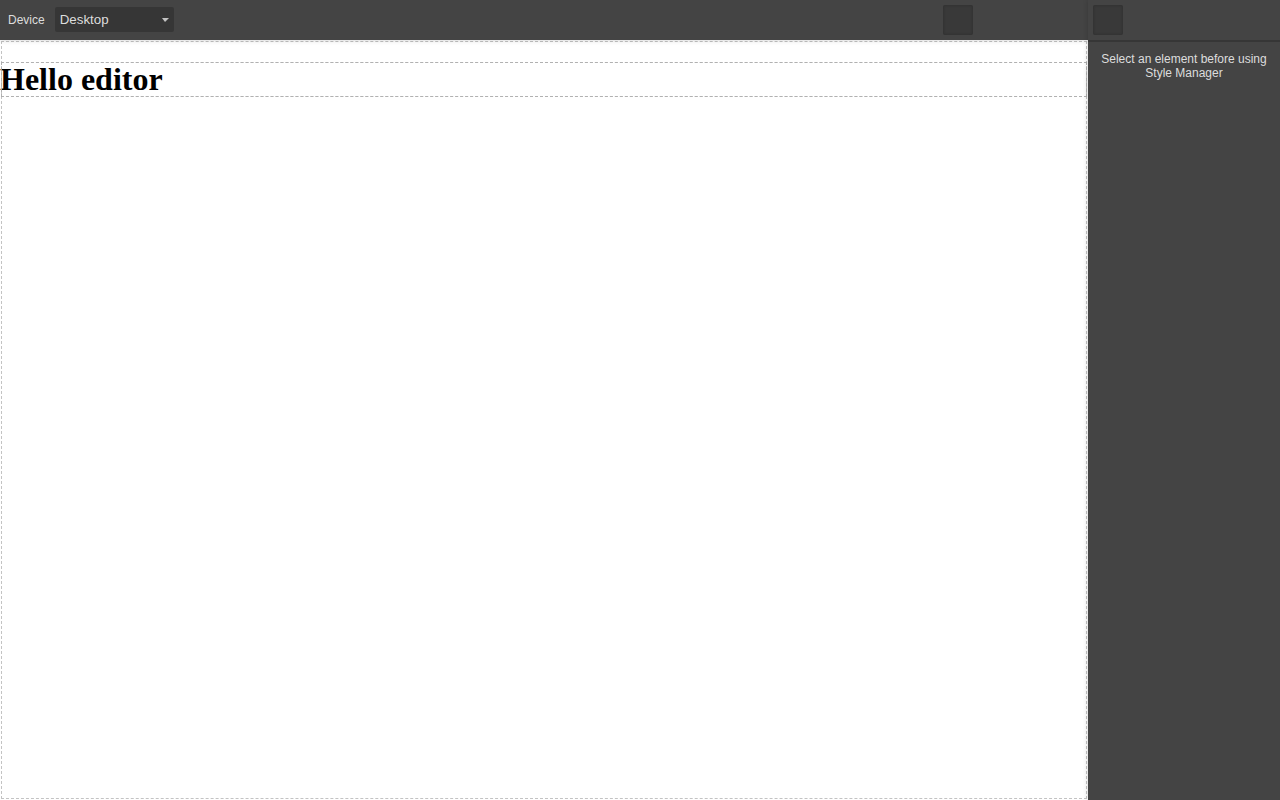
GrapesJS 0.23.5 from the code above, screenshotted from our own build at 1280×800. This is what "out of the box" actually looks like before you replace the UI.
In our benchmark this reached a rendered editor in a median of 309 ms across five loads in headless Chromium on a local server — slower than Craft.js at 94 ms and Editor.js at 70 ms, faster than React Page at 1,004 ms. The method is on the time to first editor benchmark.
Note what the screenshot shows: a functional editor that looks like a developer tool. Every team shipping GrapesJS to customers replaces those panels. That work is not in the 14 lines.
For the steps after those 14 lines, our GrapesJS guides have tested code for mounting the editor in React, Next.js and Vue, saving projects to a database and building custom blocks.
Strengths
Nothing is locked. Component types, panels, commands, style properties and storage are all replaceable through public APIs. In practice this means most product requirements are solvable without forking, which is the real test of an extension system and a test many editor libraries fail.
It runs anywhere. Because the editor is framework-agnostic, the same integration survives a front-end migration. Teams that moved from Angular to React during the last five years kept their editor; teams on a React-native builder did not have that option.
The output is portable. GrapesJS produces HTML and CSS. You can render it in an email, on a static site, inside a PHP template or through a CDN, and you can walk away from the library without a migration project, because what you stored is a web standard rather than a vendor format.
A decade of prior art. First published to npm in January 2016, the library has accumulated community plugins for most common needs — forms, tabs, sliders, custom code, email presets — and the naming convention makes them findable. Quality varies, but the surface area of solved problems is much larger than for any of the newer options.
A commercial path exists. If the surrounding application becomes the bottleneck, the Studio SDK sells the parts you would otherwise build, on the same engine, so the decision is reversible rather than a rewrite.
Limitations
We fund this site through the GrapesJS ecosystem, so this section gets more attention than the others rather than less.
The bundle is heavy. 294.6 kB gzip for the core alone, before plugins and before the stylesheet. On a marketing page that number is disqualifying; inside an authenticated editor route it is usually acceptable, but it needs a route-level code split and an honest conversation about your performance budget. Only TinyMCE, BlockNote and React Page measured larger in this dataset, and Craft.js does the drag-and-drop part in a tenth of the weight.
The default UI is not shippable. The panels are a developer's toolbar. Restyling them is not hard, but it is a real project, and it is the difference between the afternoon demo and the quarter that ships. Teams that need a finished UI on day one should look at commercial SDKs and price the difference against engineering time.
No server-side rendering. The editor requires a live DOM and an iframe, so in Next.js it must be dynamically imported with SSR disabled. This is a footnote for an authenticated editor route and a genuine problem if you wanted the editing surface itself to be server rendered.
Documentation assumes the architecture. The API reference is thorough about the managers, but guidance thins out exactly where products get built: storing assets, multi-page projects, migrating stored content between component versions, undo semantics inside custom components. Expect to read source and GitHub issues. Two of those gaps are covered by our tested guides on uploading assets to S3 and exporting HTML and CSS per page.
React integration is a wrapper, not a marriage. The React wrappers are community-maintained and they mount the editor; they do not make your components editable units. If your product's value is in your component library, the architecture is working against you.
Plugin quality is uneven. The ecosystem's age cuts both ways: widely linked plugins may not have been updated for recent releases. Budget time to audit anything you adopt, and assume you may end up maintaining a fork of a small plugin.
Pricing
GrapesJS core is free under BSD-3-Clause with no usage ceiling, no seat count and no requirement to open-source your own product. The real cost is engineering: our estimate for a customer-facing editor built on the core — replacement UI, asset storage, persistence, permissions and a block library — starts in the low hundreds of hours, which the build vs buy calculator turns into a number you can compare against a licence.
The GrapesJS Studio SDK is a separate commercial product, with a permanently free plan and paid tiers published by the vendor. If your team's constraint is time rather than money, that comparison is the one to run, and GrapesJS vs Studio SDK sets the two side by side.
Editorial assessment (hands-on)
Rated 0–10 per axis by the EditorStack team after building with GrapesJS, against the rubric on the methodology page. These are judgements, not measurements, and there is deliberately no overall number: which axis matters depends on your project. Each rating is argued below it; a rating with no argument fails the build.
- Developer experience7/10
Getting a canvas on screen takes a container element and one init call, and the event API is consistent. The cost is the mental model: components, style manager, device manager and storage manager are separate subsystems, and the defaults produce a developer-looking UI you will replace before shipping to end users.
- Extensibility9.5/10
Every part of the editor is replaceable: component types define their own traits, toolbar, and render behaviour, panels are declarative, and commands can be added or overridden. Very little of what teams build on top of GrapesJS requires forking the core, which is the practical test of an extension system.
- Documentation6.5/10
The API reference covers the managers thoroughly and the plugin guides are accurate, but the documentation assumes you already know the architecture. Recipes for common product requirements — multi-page, asset storage, undo semantics inside custom components — are thinner than the reference material.
- Ecosystem8.5/10
A decade of community plugins covers most common needs, and the plugin naming convention makes them discoverable on npm. Quality is uneven and some widely-linked plugins have not been updated for recent releases, so budget time to audit anything you adopt.
- Time to production6/10
A demo takes an afternoon; a product takes considerably longer because asset storage, persistence, permissions and a user-facing UI skin are all yours to build. That gap between demo and product is the single most underestimated cost when teams choose this engine.
Use cases and categories
- Open source visual editors
- White-label website builders
- Self-hosted page builders
- Framework-agnostic visual editors
- Free visual editor libraries
- Embeddable page builders and SDKs
- Building a drag-and-drop landing page builder into your SaaS
- Email template builder for SaaS: build it or buy it
- How to embed a page builder in a React application
- Adding a visual editor to a Next.js application
- Visual editor options for Vue applications
- White-label website builder for agencies: the real options
GrapesJS against its nearest neighbours
The closest products in the dataset by category, with the facts most people open three tabs to compare. Bundle sizes marked in kilobytes are our own measurements.
| Product | Licence | Bundle | Price from | Self-hosted |
|---|---|---|---|---|
| GrapesJS | BSD-3-Clause | 294.6 kB gzip | Free (open source) | Yes |
| CKEditor 5 | GPL-2.0-or-later OR commercial | 161.2 kB gzip | from $144/mo | Yes |
| Editor.js | Apache-2.0 | 64.3 kB gzip | Free (open source) | Yes |
| Puck | MIT | 90.4 kB gzip | Free (open source) | Yes |
GrapesJS comparisons
Each comparison is a full write-up: where each tool fits, and what moving between them costs.
GrapesJS guides
Frequently asked questions
- Is GrapesJS free for commercial use?
- Yes. GrapesJS core is published under the BSD-3-Clause licence, which permits commercial use, modification and redistribution, including inside closed-source products, with no usage ceiling and no per-seat fee. The separate GrapesJS Studio SDK is a commercial product with its own licence.
- How big is GrapesJS?
- We measured the GrapesJS core at 294.6 kB gzip (1,115.7 kB raw) for version 0.23.6, bundled with esbuild in production mode with CSS excluded. Plugins, themes and the stylesheet add to that figure.
- Does GrapesJS work with React?
- Yes, but not natively. GrapesJS renders HTML into its own iframe canvas rather than rendering your React components, so React integration means mounting the editor inside a React component and treating it as an uncontrolled widget. If you need your own React components to be the editable units, Puck or Craft.js are the better fit.
- Does GrapesJS support server-side rendering?
- No. The editor mounts against a live DOM and an iframe canvas, so it initialises in the browser only. In a Next.js application you load it with a dynamic import and rendering disabled on the server.
- Can GrapesJS export email-safe HTML?
- Yes, through the newsletter preset plugin, which switches the component set to table-based layouts and inlines CSS on export. It is a plugin, not core behaviour, and it does not include the cross-client rendering test lab that commercial email SDKs sell.
- What is the difference between GrapesJS and GrapesJS Studio SDK?
- GrapesJS is the open-source engine: you build the surrounding application. Studio SDK is a commercial product from the same team that supplies a finished editor UI, project storage and asset handling on a licence key, with a free plan available.
- Is GrapesJS still maintained?
- Version 0.23.6 was published to npm on 25 August 2026, and the first release dates to January 2016. Live repository activity — stars, open issues, contributor count — is collected by our daily sync and shown on this page once it has run.
Sources and verification
Last verified: . Facts on this page were checked against the sources below on the date shown next to each one.
- npm registry metadata for grapesjs (licence, first publish date, latest version) — accessed 2026-08-19
- GrapesJS source repository — accessed 2026-08-19
- GrapesJS documentation — accessed 2026-08-19
This profile is generated from the GrapesJS record in the open dataset (JSON, CSV). Unverified facts are left empty rather than estimated.